
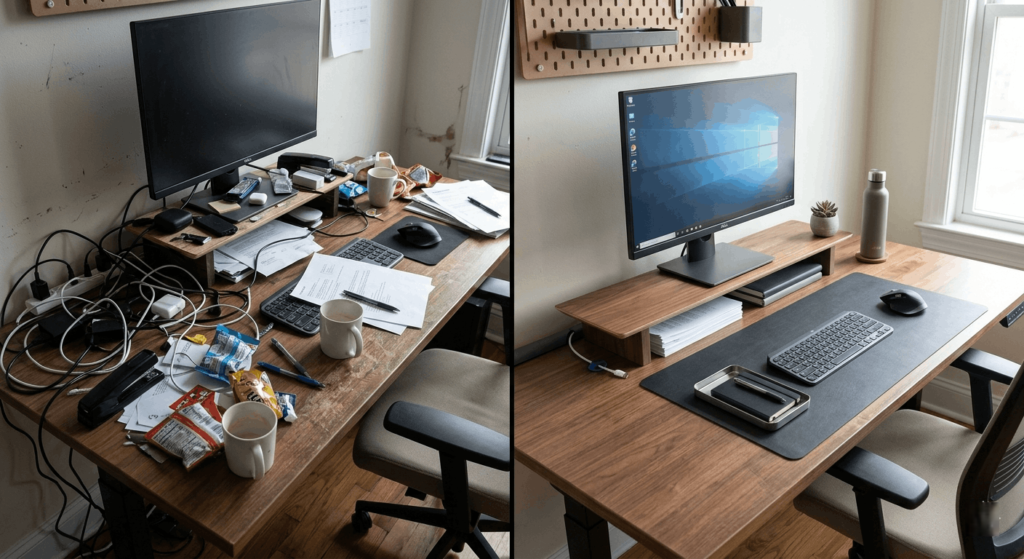
A messy desk can quietly destroy your focus, waste your time, and make even simple tasks feel stressful. If you constantly lose cables, stack papers everywhere, or struggle to find space for your keyboard and mouse, you’re not alone.
The good news is that learning how to organize a messy desk fast doesn’t require a full office makeover. With a few smart desk accessories and simple organization tools, you can transform your workspace in less than an hour.
In this guide, we’ll cover the best products for desk organization, quick decluttering strategies, and practical setup tips that actually work for
students, gamers, remote workers, and creators.
Quick Picks Table
| Best For | Product | Why It Wins |
|---|---|---|
| Best Overall | Logitech Desk Mat | Creates instant visual organization |
| Best Cable Management | JOTO Cable Sleeve | Hides messy cables quickly |
| Best Budget Pick | SimpleHouseware Desk Organizer | Affordable and practical |
| Best Premium Pick | Grovemade Desk Shelf | Elegant and functional |
| Best for Small Desks | HUANUO Monitor Stand | Adds vertical storage |
| Best for Productivity | Yamazaki Desk Organizer | Minimal clutter design |
Best Products to Organize a Messy Desk Fast
Logitech Desk Mat
- Best For: Creating a clean workspace instantly
- Key Features: Large surface area, spill-resistant material, minimalist design
- Pros:
- Covers visual clutter
- Protects desk surface
- Improves mouse movement
- Cons:
- Doesn’t add storage
- Why We Recommend It:
A desk mat immediately makes a workspace feel more organized and intentional. - Ideal User: Students, remote workers, gamers
JOTO Cable Management Sleeve
- Best For: Hiding messy cables
- Key Features: Flexible sleeve design, reusable zipper, multiple cable support
- Pros:
- Easy to install
- Makes desk look cleaner instantly
- Affordable
- Cons:
- Not ideal for extremely thick cables
- Why We Recommend It:
Cable clutter is one of the biggest causes of a messy desk. This solves it fast. - Ideal User: PC users, gamers, streamers
SimpleHouseware Mesh Desk Organizer
- Best For: Paper and stationery storage
- Key Features: Multi-compartment layout, metal mesh construction
- Pros:
- Budget-friendly
- Compact design
- Easy to access items
- Cons:
- Industrial look may not match all setups
- Why We Recommend It:
Great for quickly sorting papers, pens, sticky notes, and office supplies. - Ideal User: Students and office workers
Grovemade Desk Shelf
- Best For: Premium minimalist setups
- Key Features: Wooden design, monitor elevation, hidden storage
- Pros:
- Beautiful aesthetics
- Improves ergonomics
- Adds hidden organization
- Cons:
- Expensive
- Why We Recommend It:
Perfect for turning chaotic desks into clean, modern workspaces. - Ideal User: Designers, creators, professionals
HUANUO Monitor Stand
- Best For: Small desk organization
- Key Features: Adjustable height, under-monitor storage space
- Pros:
- Saves desk space
- Improves posture
- Adds extra storage
- Cons:
- Limited weight capacity
- Why We Recommend It:
Vertical organization instantly frees up desk space. - Ideal User: Laptop and monitor users
Yamazaki Desk Organizer Tray
- Best For: Minimalist desk setups
- Key Features: Compact compartments, modern design
- Pros:
- Stylish appearance
- Keeps essentials accessible
- Small footprint
- Cons:
- Limited capacity
- Why We Recommend It:
Ideal for keeping only your most-used items nearby. - Ideal User: Minimalists and creatives
Bluelounge Cable Clips
- Best For: Managing charging cables
- Key Features: Adhesive clips, multiple cable slots
- Pros:
- Prevents cable tangles
- Easy setup
- Clean appearance
- Cons:
- Adhesive may weaken over time
- Why We Recommend It:
Stops cables from falling behind the desk constantly. - Ideal User: Anyone with multiple chargers
Vaydeer Dual Monitor Stand
- Best For: Multi-monitor setups
- Key Features: Large shelf space, storage drawers
- Pros:
- Excellent organization
- Supports larger setups
- Strong build quality
- Cons:
- Takes more desk depth
- Why We Recommend It:
Great for productivity-focused desk organization. - Ideal User: Developers, editors, multitaskers
IKEA SKÅDIS Pegboard
- Best For: Vertical desk storage
- Key Features: Customizable accessories, wall-mounted design
- Pros:
- Saves desk space
- Highly customizable
- Modern appearance
- Cons:
- Requires wall installation
- Why We Recommend It:
One of the fastest ways to remove clutter from the desk surface. - Ideal User: DIY creators and students
Orbitkey Desk Pouch
- Best For: Portable organization
- Key Features: Compact pouch, internal cable storage
- Pros:
- Keeps accessories together
- Travel-friendly
- Premium quality
- Cons:
- Small capacity
- Why We Recommend It:
Perfect for organizing chargers, flash drives, and small gadgets. - Ideal User: Students and remote workers
- CTA Line: Check latest price
Buying Guide
How to Choose Desk Organization Products
1. Consider Your Desk Size
Small desks benefit from vertical storage like monitor stands and pegboards. Larger desks can handle shelves and wider organizers.
2. Prioritize Cable Management
Visible cables create instant visual clutter. Cable sleeves, clips, and under-desk trays can dramatically improve desk appearance.
3. Focus on Daily Workflow
Think about the items you use every day. The best desk setup keeps essential tools accessible without overcrowding the workspace.
4. Choose Durable Materials
Metal organizers last longer, while wooden accessories often look more premium and blend better with modern setups.
5. Think About Aesthetics
A clean, consistent style helps your desk feel calmer and more organized.
6. Budget Wisely
You don’t need expensive accessories to organize a messy desk fast. Even simple cable clips and trays can make a huge difference.
7. Buy for Your Use Case
- Students: Compact organizers and monitor stands
- Gamers: Cable management and large desk mats
- Remote Workers: Ergonomic monitor shelves and drawers
- Creators: Minimalist storage with flexible layouts
Comparison Section
| Product | Best Feature | Ideal For | Price Range |
|---|---|---|---|
| Logitech Desk Mat | Instant clean look | General users | $18.00 |
| Grovemade Desk Shelf | Premium aesthetics | Professionals | $29.00 |
| JOTO Cable Sleeve | Cable cleanup | Gamers & PC users | $8.00 |
FAQ Section
How do I organize my desk quickly?
Start by removing everything from the desk, throwing away trash, grouping similar items together, and using organizers for cables and accessories.
What causes a desk to become messy?
Too many loose items, poor cable management, lack of storage, and keeping unnecessary items on the desk are the most common causes.
Are desk organizers worth buying?
Yes. Good desk organizers improve productivity, reduce stress, and make workspaces easier to maintain.
What is the fastest way to make a desk look clean?
Use a large desk mat, hide cables, and remove unnecessary items from the visible workspace.
How can I organize a small desk?
Use vertical space with monitor stands, pegboards, and wall-mounted storage instead of large desktop organizers.
Should I keep decorations on my desk?
A few decorations are fine, but too many items create visual clutter and reduce usable space.
How often should I clean my desk?
A quick daily cleanup and a deeper weekly organization session work best for most people.