
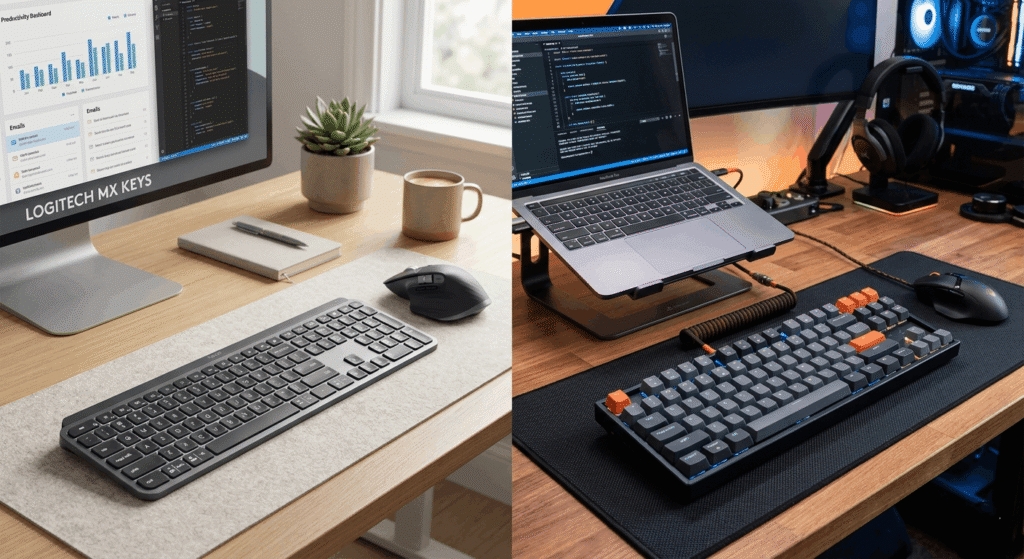
Choosing the right keyboard can dramatically improve your workflow, comfort, and overall productivity. If you’re comparing the Logitech MX Keys vs Keychron K8, you’re likely deciding between a premium low-profile productivity keyboard and a versatile mechanical keyboard designed for both work and casual gaming.
Both keyboards are highly popular, but they serve different types of users. The Logitech MX Keys focuses on quiet typing, smart productivity features, and seamless multi-device support, while the Keychron K8 offers a mechanical typing experience with customization and better tactile feedback.
In this guide, we’ll compare the Logitech MX Keys and Keychron K8 in detail, including design, typing feel, battery life, gaming performance, connectivity, and overall value to help you choose the right keyboard for your setup.
Quick Picks Table
| Best For | Product | Why It Wins |
|---|---|---|
| Best Overall Productivity | Logitech MX Keys | Quiet typing, premium build, excellent battery |
| Best Mechanical Experience | Keychron K8 | Tactile switches and hot-swappable options |
| Best for Mac Users | Logitech MX Keys | Excellent macOS integration |
| Best Budget Mechanical Choice | Keychron K8 | Great value for mechanical enthusiasts |
| Best for Office Use | Logitech MX Keys | Silent and comfortable for long work sessions |
| Best for Customization | Keychron K8 | Switch and keycap customization support |
Logitech MX Keys
- Best For: Productivity, office work, Mac users
- Key Features:
- Low-profile scissor switches
- Smart backlighting
- Multi-device pairing
- USB-C charging
- Long battery life
- Premium aluminum design
Pros
- Extremely quiet typing
- Comfortable for long sessions
- Excellent battery performance
- Premium build quality
- Easy switching between devices
Cons
- Not ideal for gaming enthusiasts
- Limited customization
- More expensive than many membrane keyboards
Why We Recommend It
The Logitech MX Keys is one of the best productivity keyboards available today. It offers a refined typing experience that feels smooth, quiet, and reliable. The keyboard is especially popular among programmers, writers, designers, and remote workers.
Ideal User
Professionals, students, content creators, and office workers who prioritize comfort and productivity.
Keychron K8
- Best For: Mechanical keyboard lovers, casual gaming, customization
- Key Features:
- Tenkeyless mechanical layout
- Bluetooth and wired modes
- Gateron switch options
- Mac and Windows compatibility
- RGB lighting options
- Hot-swappable versions available
Pros
- Excellent tactile typing feel
- Great value for money
- Mechanical switch customization
- Suitable for gaming and productivity
- Compact desk-friendly design
Cons
- Bulkier than MX Keys
- Louder typing noise
- Battery life varies with RGB usage
Why We Recommend It
The Keychron K8 is perfect for users who enjoy mechanical keyboards without spending premium enthusiast-level prices. It balances typing comfort, gaming capability, and customization very well.
Ideal User
Gamers, developers, mechanical keyboard fans, and users who prefer tactile feedback.
Design and Build Quality
Logitech MX Keys
The MX Keys features a sleek, modern design with a low-profile form factor. The metal top plate gives it a premium feel while maintaining stability during typing. It looks professional on almost any desk setup.
Keychron K8
The Keychron K8 has a more traditional mechanical keyboard appearance. It is thicker and heavier but feels solid and durable. The floating keycap design gives it a modern mechanical aesthetic.
Typing Experience
Logitech MX Keys
Typing on the MX Keys feels smooth and quiet. The keys have a slight concave shape that helps finger positioning, making it excellent for long typing sessions.
Keychron K8
The K8 delivers a satisfying mechanical typing experience. Depending on the switch type you choose, it can feel tactile, clicky, or linear. Many users prefer it for coding and gaming because of the physical feedback.
Gaming Performance
Logitech MX Keys
The MX Keys can handle casual gaming, but it is not designed specifically for gamers. The low-profile scissor switches lack the responsiveness of dedicated mechanical switches.
Keychron K8
The Keychron K8 performs significantly better for gaming thanks to mechanical switches and lower latency in wired mode. It’s suitable for both casual and competitive gamers.
Connectivity and Compatibility
| Feature | Logitech MX Keys | Keychron K8 |
|---|---|---|
| Bluetooth | Yes | Yes |
| Wired Mode | USB-C charging only | Yes |
| Multi-Device Support | Yes | Yes |
| macOS Support | Excellent | Excellent |
| Windows Support | Excellent | Excellent |
| Linux Compatibility | Good | Good |
Battery Life
Logitech MX Keys
The MX Keys offers outstanding battery life, especially when backlighting is disabled. Many users can go weeks between charges.
Keychron K8
Battery life is decent, but RGB lighting can drain it faster. Without RGB, battery performance improves significantly.
How to Choose Keyboard Products
Choosing between the Logitech MX Keys vs Keychron K8 depends on your personal workflow and typing preferences.
Budget
If you want a premium productivity experience, the MX Keys justifies its price. If you want a mechanical keyboard at a reasonable price, the K8 provides excellent value.
Quality
Both keyboards are well-built, but they focus on different experiences. MX Keys emphasizes refinement and comfort, while the K8 emphasizes tactile feedback and versatility.
Features
Choose MX Keys for:
- Smart illumination
- Quiet typing
- Productivity workflows
- Multi-device office setups
Choose Keychron K8 for:
- Mechanical switches
- Gaming
- Customization
- RGB lighting
Size
The Keychron K8 uses a tenkeyless layout, saving desk space. MX Keys includes a full-size layout with a numpad.
Compatibility
Both keyboards support macOS and Windows well, making them excellent cross-platform choices.
Brand Trust
Logitech has a long-standing reputation for office peripherals. Keychron has become highly respected among mechanical keyboard enthusiasts.
Warranty
Warranty policies vary by region and retailer, so always check before purchasing.
Who Should Buy What
- Buy MX Keys if you prioritize productivity and quiet typing.
- Buy Keychron K8 if you want a mechanical experience with customization.
Comparison Table
| Feature | Logitech MX Keys | Keychron K8 | Logitech K780 |
|---|---|---|---|
| Keyboard Type | Scissor-switch | Mechanical | Membrane |
| Noise Level | Quiet | Moderate/Loud | Quiet |
| Gaming Performance | Basic | Good | Basic |
| Battery Life | Excellent | Good | Excellent |
| Customization | Limited | High | Limited |
| Best For | Productivity | Gaming + Typing | Budget productivity |
FAQ Section
Is Logitech MX Keys better than Keychron K8?
It depends on your needs. MX Keys is better for productivity and quiet office work, while the Keychron K8 is better for mechanical typing and gaming.
Is the Keychron K8 good for programming?
Yes. Many programmers enjoy the tactile feedback and comfortable typing experience of the K8.
Can you game on Logitech MX Keys?
Yes, but it is better suited for casual gaming rather than competitive gaming.
Which keyboard is quieter?
The Logitech MX Keys is significantly quieter than the Keychron K8.
Does Keychron K8 work with Mac?
Yes. The Keychron K8 includes macOS support and Mac-specific keycaps.
Which keyboard has better battery life?
The Logitech MX Keys generally offers better battery efficiency.
Is Logitech MX Keys worth the price?
Yes, especially for professionals who type for long hours daily.